Jul
Uncategorized
What’s New in Pro Tools Studio 2026: Immersive Audio, Track Pinning, and AI-Driven Speed
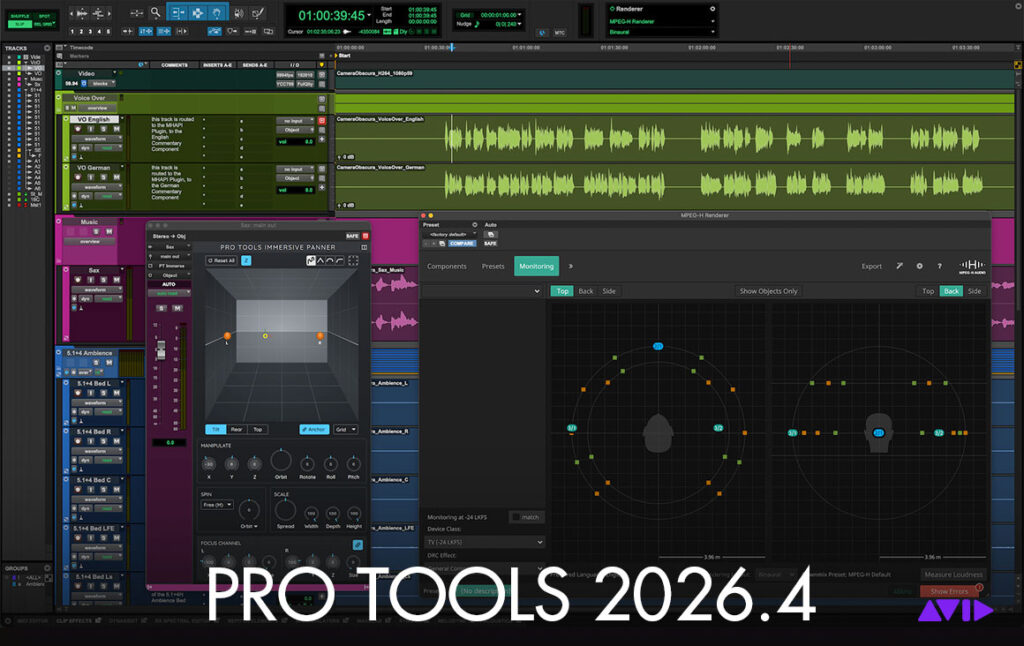
The Pro Tools 2026.4 release brings major updates to Avid’s flagship digital audio workstation. Designed to streamline workflows in dense sessions, expand spatial audio monitoring, and inject new creative sound design options directly into the DAW, this release gives music producers, sound designers, and post-production engineers significant productivity boosts.
Key Highlights of Pro Tools Studio 2026
1. Stay Anchored with Track Pinning
When managing massive sessions with hundreds of audio tracks, staying oriented used to mean endless vertical scrolling.
- Lock Key Elements in Place: The new Track Pin feature lets you freeze essential tracks—such as lead vocals, dialogue guides, or reference drums—at the top of the Edit window while scrolling freely through the rest of your session.
- Dedicated Navigation: Search and jump directly to pinned tracks without losing your place in complex timelines.
2. Next-Generation Immersive Audio Workflows
Pro Tools Studio expands its spatial audio features beyond Dolby Atmos by introducing native support for emerging global broadcast standards:
- MPEG-H Support: Work directly with the MPEG-H Renderer plugin (developed by Fraunhofer IIS and included for Studio and Ultimate tiers). This object-based format enables interactive broadcast delivery, multiple language paths, and localized dialogue enhancements.
- Pro Tools Immersive Panner: Features an updated, modernized panning interface with multi-channel object support up to 9.1.6, allowing you to handle multiple spatial formats within a single project.
- Dolby Headphone Personalization: Achieve more accurate binaural monitoring by importing custom Head Related Transfer Function (HRTF) profiles generated via mobile phone scans using Sonarworks’ free SoundID Tools app.
┌─────────────────────────────────────────────────────────────┐
│                   Pro Tools Immersive Hub                   │
├──────────────────────────────┬──────────────────────────────┤
│ MPEG-H Renderer              │ Dolby Headphone Profile      │
│ • Object-based panning       │ • Custom HRTF profiles       │
│ • Multi-language streams     │ • Smartphone camera scan     │
│ • Up to 9.1.6 setups         │ • Spatial accuracy on cans   │
└──────────────────────────────┴──────────────────────────────┘
3. Integrated Speech-to-Text Enhancements
Building on the AI-powered transcription engine, dialogue and lyric editing are faster and more fluid:
- Transcription Data Passthrough: Text metadata now automatically passes through rendered audio operations such as AudioSuite processing, Consolidate, Commit, and Track Bounces.
- Granular Clip Splitting: Automatically slice timeline clips by word, sentence, or detected speaker for rapid dialogue editing.
- Hardware Acceleration: Choose between CPU or GPU processing modes for local text-analysis workflows.
4. Built-in Native Instruments & Creative Plugins
For music production, Avid has bundled fresh virtual instruments and processing tools directly into the installation:
- Massive X Player: Native Instruments’ synth engine is now accessible inside Pro Tools. All users receive the Pro Tools Massive X Essentials pack, with active subscribers gaining access to the Lo-Fi & Chill Plucks and Haze sound expansions.
- Inner Circle Rewards: Active perpetual plan holders and annual subscribers gain access to Bogren Digital Ampknob BDH III (high-gain tube amp emulation) and Cut Classic Bad Math (multiband fuzz and distortion).
5. Quality-of-Life Speed Improvements
- Batch File Renaming: Rename clips and files in bulk using customizable prefix/suffix rules.
- Grid Brightness & Opacity: Fine-tune grid line visibility directly in the Edit window.
- Plugin Favorites: Quickly bookmark frequented Elastic Audio and ARA plugins for faster menu navigation.
Pro Tools Tier Feature Matrix (2026)
| Feature | Pro Tools Artist | Pro Tools Studio | Pro Tools Ultimate |
| Track Pinning | Yes | Yes | Yes |
| Massive X Player | Yes | Yes | Yes |
| MPEG-H Renderer | No | Yes | Yes |
| Dolby Headphone Personalization | No | Yes | Yes |
| Speech-to-Text Advanced Tools | No | Yes | Yes |
Upgrade Recommendations
- For Music Producers: The addition of Massive X Player alongside Track Pinning makes navigating long arrangement sessions and generating synth textures effortless without leaving the main window.
- For Audio Post Engineers: Transcribe data passthrough during clip commits and native MPEG-H delivery streamline dialogue-heavy and multi-format broadcast projects.
This release balances raw audio power with essential visual workflow fixes, keeping key tracks visible and complex immersive mixing tasks manageable.
Pro Tools 2026: The Workflow Improvements You’ll ACTUALLY Use
This video provides a quick hands-on walkthrough of the top workflow upgrades introduced in the 2026 update, such as Track Pinning, Batch Renaming, and Speech-to-Text transcription.
Purchase & Download the Latest Pro Tools Studio Version Now
